LEADERSHIP DEVELOPMENT
.png)
Course Sample 1: Canva for Business
I was selected by a member of Topgolf’s Executive Leadership Team to create and facilitate a 1.5-hour Lunch & Learn training for employees at Topgolf Headquarters focused on effective use of Canva. This interactive instructor-led session (delivered both live and virtually) covered core platform functionality, system navigation, available resources, brand-compliant design best practices, and the use of AI tools to create documents, flyers, and presentation materials.
The session resulted in measurable improvement in the quality and brand alignment of creative assets produced across departments, demonstrating increased design confidence and stronger adherence to corporate branding standards.

PRINT MATERIALS


POWERPOINT

Welcome, everyone, to Canva for Business: Design Smarter Not Harder." We're delighted to have you here with us forLevel Up Live! My name is Shannon Keller, I'm an Instructional Designer on the Training Team. Today, I'll be your Canva guide. We'll explore how to enhance your design skills and streamline your processes using Canva's cutting edge tools. Note you have a handout with a few reminders of what we will learn today. Keep this handy as it will be used in a play session later on. Let's get started!

By the end of today’s session, you will acquire some exciting new skills. We will delve into how to leverage the power of AI to create a presentation in Canva.
This approach is a true game-changer for saving time and enhancing your creativity.
Following that, we’ll explore Canva's pre-designed templates, layouts, and styles. These tools offer a straightforward way to elevate your designs without the need to start from scratch.

Canva is an intuitive design platform that empowers everyone—from beginners to professionals—to create stunning visuals effortlessly.
With Canva, you have access to a vast library of templates, fonts, and images, making it easy to bring your creative visions to life. This means whether you're designing for social media, presentations, or any other project, you have all the resources you need at your fingertips.

To begin with, we'll explore how our People department is utilizing Canva for business and cultural initiatives at Topgolf.
This will introduce you with the many ways you can incorporate Canva into your workflow.
(Examples of work shown in the PowerPoint slides are omitted from this sample.)

Canva provides several design plans upon signing up, including a personal plan tailored just for individual users.
For businesses, such as Topgolf, Canva for Business is essential, as the content created is intended for commercial purposes. This requirement aligns with licensing and copyright laws.
Canva for Business includes advanced features, which we will explore today, such as branding packages and AI tools. Currently, the price for Canva for Business is $20 per month.

(passwords to 4 sandbox accounts are divided up across the room and online)
And with that - let's get started!

Now that you're logged in, you'll notice a bookmark bar on the left side of the page.
In today’s session, we will concentrate on three specific buttons:
The Home Page – located right here
The Create Button – found here
and the Canva AI Button – situated closer to the bottom of the page here. Let's start with the Home Button.
Please select the Home button at the top of the bookmark bar.
(The Create, Canva Ai, and Styles and Layouts sections are omitted from this sample.)

You are now officially on the planning commitee for the holiday party. Your mission, should you choose to accept it, is to design a promotional flyer that advertises the most amazing Topgolf holiday party ever.
Be as creative, wild, or elegant as you want. Make it fun and playful Include in your design: the name of your party, time, location or venue, dress code and 3-5 key elements such as: theme of the party, food & drinks, entertainment, activities & games, or special surprises.
Don't hesitate to ask questions along the way -
You have 25 minutes to create your presentation.

Please share your designs. To do this, take a screenshot of your flyer and share it in the chat.

The first place to find more resources in the Design school in Canva found here.This includes tutorials on design principals if you are interested in learning more about graphic design overall.
On the Home page of each account is a presentation with Topgolf's brand book - including all of our colors, fonts, logos, and rules for how to use each. If you decide to get a business account later on, you will need to add all of these colors, fonts, and logos into your brand book later on.

In this session you have learned how to:
Use Ai to build a presentation in Canva
Use Canva templates, layouts and styles
Enhance your designs with infographs
Know where to go to learn more!

The first place to find more resources in the Design school in Canva found here.This includes tutorials on design principals if you are interested in learning more about graphic design overall.
On the Home page of each account is a presentation with Topgolf's brand book - including all of our colors, fonts, logos, and rules for how to use each. If you decide to get a business account later on, you will need to add all of these colors, fonts, and logos into your brand book later on.

LEADERSHIP DEVELOPMENT
Course Sample 2: Responsible Alcohol Service for Managers
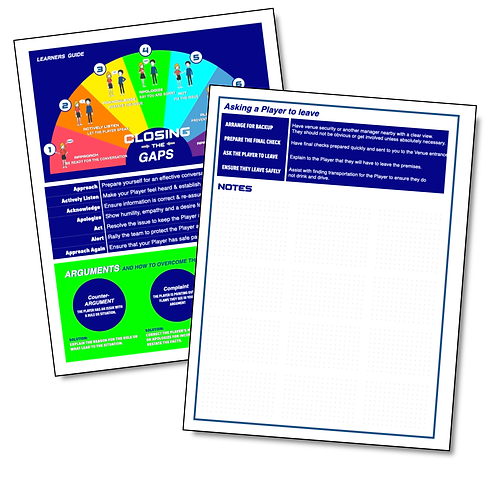
For all safety and human resources initiatives, I was responsible for designing and developing Manager-level training. The featured sample focuses on the high-stakes responsibilities of Managers in situations involving alcohol service and guest safety.
I selected this piece because it demonstrates the integration of operational decision-making with legal and ethical considerations—an essential competency that distinguishes high-performing leaders.
PRINT MATERIALS


POWERPOINT


